Picture this: you receive a monthly invoice from your web agency or hosting provider. It says “Website Hosting & Maintenance $299/month”. No breakdown. No explanation of what you’re actually getting. You pay it because your website is still online but you have no idea whether you’re getting good value, overpaying, or quietly missing critical services that could hurt your business.
You’re not alone. This is one of the most common frustrations business owners share when they come to us. The terminology is vague, the industry is inconsistent, and the pricing feels arbitrary.
This guide cuts through all of that. We’ll walk you through exactly what website hosting and maintenance cost in 2026, what each component includes, which plan tier suits your business, and the questions you must ask before signing any contract. Whether you’re wondering about website maintenance cost for a small business, trying to figure out how much a website costs per month, or evaluating website maintenance packages from different providers this is the definitive breakdown you’ve been looking for.
At Webfoundr, we believe transparency builds trust. So, let’s start with the basics. You can also explore our hosting and maintenance plans directly if you’d like to see what we offer.
Hosting vs. Maintenance What's the Difference?
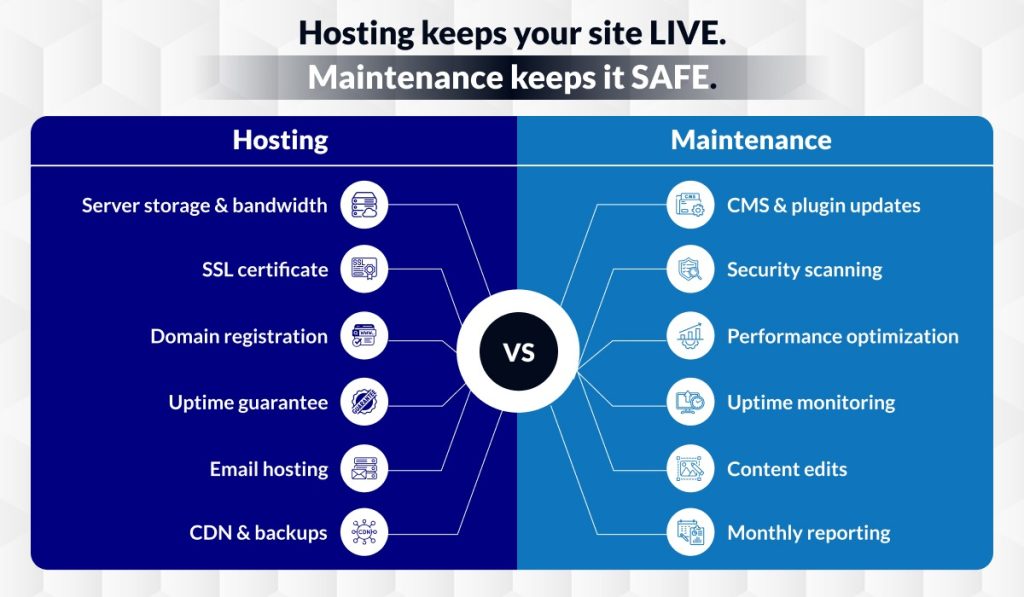
Before we talk numbers, let’s clear up the single biggest source of confusion: hosting and maintenance are two completely different things. Many providers bundle them together under one vague label, but they serve entirely different purposes and understanding the distinction will help you evaluate any quote you receive.
What Is Website Hosting?
Website hosting is the infrastructure that keeps your website live and accessible on the internet, 24 hours a day, 7 days a week. When someone types your web address into a browser, hosting is what delivers your website to their screen. Think of it as renting space on a server a powerful computer that stores all your website files, databases, and media, and serves them to visitors on demand.
Hosting is the non-negotiable foundation. Without it, your website simply doesn’t exist online.
Learn more: What is web hosting and why every local business needs it
What Is Website Maintenance?
Website maintenance is the ongoing work that keeps your site secure, functional, fast, and up to date after it’s live. It’s everything that happens behind the scenes to ensure your website doesn’t get hacked, slow down, break, or fall behind technically.
If hosting is the building, maintenance is the cleaning crew, the security system, the plumber who fixes things when they break, and the electrician who makes sure everything is up to code.
Why Both Are Non-Negotiable
A lot of business owners invest in hosting but neglect maintenance or assume their hosting provider handles both. This is a costly mistake. Without proper maintenance, even the most reliable hosting environment will eventually produce a broken, outdated, or compromised website. And without solid hosting, even the most well-maintained website will be slow, insecure, or inaccessible.
The two work together. For a closer look at how hosting quality specifically impacts your site’s performance and search visibility, see: Small business website hosting what to look for.
What Does Website Hosting Include?
The word ‘hosting’ gets used loosely, but a solid hosting plan should include several specific components. Here’s what to look for and what questions to ask if something isn’t clearly listed.
Server Storage & Bandwidth
Your hosting plan allocates a certain amount of disk space (for your files, images, and databases) and bandwidth (the amount of data transferred when visitors access your site). Entry-level plans may be enough for a simple brochure site, but businesses with lots of images, videos, or traffic will need more generous allocations.
Uptime Guarantee
Uptime refers to the percentage of time your website is accessible to visitors. Reputable hosts guarantee 99.9% uptime or higher. The difference between 99.9% and 99.99% might sound trivial, but 99.9% allows for up to 8.7 hours of downtime per year which matters enormously if you’re running an eCommerce store or generating leads through your site.
SSL Certificate
An SSL certificate encrypts the connection between your website and your visitors’ browsers it’s what puts the ‘S’ in HTTPS and shows the padlock icon in the browser bar. Google confirmed SSL as a ranking factor years ago, and modern browsers actively warn users when a site doesn’t have one. Most hosting providers include a free SSL certificate, but the type matters.
Read: DV vs OV vs EV SSL certificates and how to get a free SSL certificate with hosting.
Domain Name Registration & Renewal
Your domain name (e.g., yourbusiness.com) is your address on the internet. Some hosting packages include domain registration for the first year; others require you to purchase it separately. Either way, domain renewal is an annual recurring cost you need to budget for.
See: how to buy a domain name in the USA and creative domain name ideas for your business.
Email Hosting
Professional email hosting (e.g., you@yourbusiness.com) is sometimes bundled with website hosting, and sometimes sold as a separate add-on. Using a branded email address instead of a free Gmail or Outlook account builds credibility and trust.
Learn how to set it up: how to get free email hosting with your domain.
CDN (Content Delivery Network)
A CDN distributes your website’s files across multiple servers around the world so that visitors get data from the server closest to them dramatically improving load times regardless of geographic location. This is especially important for businesses with audiences across North America or internationally.
Automated Backups
Your hosting should include regular automated backups of your entire website files and database. Daily backups are the gold standard. Weekly backups are the bare minimum. Without backups, a hack, a bad update, or a simple human error could wipe out your entire site with no way to recover it.
Security Firewall & DDoS Protection
A web application firewall (WAF) filters malicious traffic before it reaches your site. DDoS protection prevents distributed attacks that try to overwhelm your server with fake traffic. These are essential, not optional especially as cyberattacks on small business websites have become increasingly common.
Customer Support
Support quality varies enormously between hosting providers. 24/7 live chat with knowledgeable technical staff is the ideal. Ticket-only support with multi-day response times is a red flag. Always test support responsiveness before committing to a provider.
Webfoundr Hosting Includes:
- Free SSL certificate included on all plans
- Daily automated backups with off-site storage
- 99.99% uptime SLA guarantee
- Firewall, malware scanning, and DDoS protection
- North American server locations for local SEO advantage
- 24/7 technical suppor
→ See all hosting features
Types of Hosting: Which One Does Your Business Need?
Not all hosting is created equal. The type of hosting you choose determines your site’s speed, security, scalability, and cost. Here’s how the main categories break down in 2026:
| Hosting Type | Best For | Avg. Monthly Cost (2026) |
|---|---|---|
| Shared Hosting | Starter blogs, simple brochure sites | $3–$15/mo |
| VPS Hosting | Growing businesses with moderate traffic | $20–$100/mo |
| Dedicated Server | High-traffic sites, complex eCommerce | $100–$500+/mo |
| Managed WordPress | WordPress-based business sites | $25–$150/mo |
| Cloud Hosting | Variable/scalable traffic needs | $10–$300+/mo |
| Fully Managed (Bundled) | Businesses who want zero tech headaches | Custom / Bundled |
Shared Hosting
Shared hosting puts your website on a server alongside many other websites, sharing the same resources. It’s the cheapest option, but performance can suffer if a neighboring site experiences a traffic spike. Suitable for new websites with low traffic, personal blogs, or placeholder sites.
VPS Hosting
A Virtual Private Server gives you a dedicated slice of a shared physical server with guaranteed resources. You get better performance, more control, and greater security than shared hosting without the cost of a full dedicated server. A good middle-ground for growing businesses.
Dedicated Server
A dedicated server means the entire physical machine is yours. Maximum performance, full control, and complete resource isolation. Overkill for most small businesses, but essential for high-traffic eCommerce sites, membership platforms, or applications with complex databases.
Managed WordPress Hosting
Managed WordPress hosting is specifically optimized for WordPress sites. The hosting environment is configured for WP performance, automatic WordPress core updates are handled for you, and support teams specialize in WordPress issues. Ideal for businesses whose sites run on WordPress.
Fully Managed Hosting
Fully managed hosting bundles hosting infrastructure with hands-on management meaning the provider handles setup, configuration, security, updates, monitoring, and support. You pay more, but you get true peace of mind and a team handling everything. This is what Webfoundr’s Fully Managed Plan delivers.
Also see: best managed hosting in Canada | best affordable hosting plans | web hosting for small businesses in the USA
How Hosting Directly Affects Your SEO & Website Speed
Your hosting choice isn’t just a technical decision it’s a marketing decision. Google’s Core Web Vitals are now a confirmed ranking factor, which means your server’s response time, uptime consistency, and geographic location directly impact where you appear in search results.
Server response time (TTFB): Google measures how quickly your server responds to the first request. A slow server means a poor TTFB score, which hurts your Core Web Vitals ranking.
Server location: If your target audience is in the USA or Canada, hosting your site on North American servers reduces data travel time and improves load speed for local visitors.
Uptime and crawl budget: If your site is frequently down, Google’s crawler may deprioritize it. Consistent uptime protects your indexability and search presence.
HTTPS / SSL: Google explicitly flags non-HTTPS sites as ‘Not Secure’ and gives ranking preference to secure sites.
Deep dives: How web hosting affects website speed and SEO | Best hosting for local SEO | Why local web hosting is better for SEO in North America
What Does Website Maintenance Include?
Website maintenance is the ongoing, proactive work that keeps your site secure, fast, functional, and current. A comprehensive website maintenance package should cover all of the following areas:
Security Maintenance
- CMS core updates keeping WordPress, Drupal, or your platform’s core software current and patched against known vulnerabilities
- Plugin and theme updates outdated plugins are the #1 cause of WordPress hacks
- Malware scanning and removal proactive detection and clean-up of infections
- Login protection limiting login attempts, two-factor authentication, and CAPTCHA implementation
- Firewall rule management keeping your WAF rules updated as new threats emerge
Performance Optimization
- Page speed tuning identifying and resolving bottlenecks that slow down your site
- Image compression and lazy loading ensuring media files don’t drag down load times
- Caching configuration server-side and browser caching setup and maintenance
- Core Web Vitals monitoring tracking Largest Contentful Paint (LCP), Cumulative Layout Shift (CLS), and Interaction to Next Paint (INP)
Backups & Disaster Recovery
- Scheduled automated backups daily is the standard for business sites
- Off-site backup storage backups stored separately from your primary server
- Recovery testing verifying that backups can actually be restored (often skipped by budget providers always ask)
Content Updates
- Minor text and image edits updating hours, team members, pricing, products
- Blog publishing support formatting and uploading content you provide
- Form and CTA testing ensuring contact forms, quote requests, and lead capture tools are working correctly
Monitoring & Reporting
- 24/7 uptime monitoring with instant alerts so you know the moment your site goes down
- Monthly performance reports traffic, speed scores, uptime, and security summaries
- Broken link and 404 monitoring catching and fixing dead links before they frustrate visitors or harm SEO
Technical Support & Developer Access
- Bug fixes and compatibility patches resolving issues caused by plugin conflicts or updates
- Post-update troubleshooting catching and fixing problems introduced by software updates
- On-call developer hours for urgent issues or small enhancements beyond routine maintenance
- For businesses looking at broader IT support alongside website maintenance.
See: Managed IT services for small businesses
Website Hosting and Maintenance Cost in 2026
Now the question everyone wants answered: what does website hosting and maintenance cost per month in 2026? The honest answer is: it depends on your site’s complexity, the level of service you need, and whether you’re managing anything yourself. Here’s a realistic breakdown.
Website Hosting Cost Per Month
| Hosting Type | Monthly Cost Range | Annual Cost Estimate |
|---|---|---|
| Shared Hosting | $3–$15/mo | $36–$180/yr |
| VPS Hosting | $20–$100/mo | $240–$1,200/yr |
| Dedicated Server | $100–$500+/mo | $1,200–$6,000+/yr |
| Managed WordPress | $25–$150/mo | $300–$1,800/yr |
| Cloud Hosting | $10–$300+/mo | $120–$3,600+/yr |
| Fully Managed (All-in) | $99–$500+/mo | $1,188–$6,000+/yr |
Website Maintenance Cost Per Month
| Maintenance Tier | What’s Included | Monthly Cost |
|---|---|---|
| DIY / Basic | Manual updates and backups only | $0–$50/mo |
| Essential Package | Security + updates + uptime monitoring | $50–$150/mo |
| Professional Package | All above + content edits + monthly reports | $150–$500/mo |
| Agency / Full-Service Retainer | Full dev support, strategy, CRO, priority SLA | $500–$2,000+/mo |
What Factors Drive the Cost Up or Down?
Platform complexity: A simple WordPress brochure site costs far less to maintain than a WooCommerce store with 500+ products, custom integrations, and membership functionality.
Number of plugins and integrations: Every plugin adds a potential vulnerability and update requirement. More plugins = more maintenance time.
Update frequency: Sites that require frequent content changes, new pages, or design updates need more hands-on maintenance hours.
eCommerce functionality: Online stores require additional security, payment gateway maintenance, inventory management, and compliance considerations.
Traffic volume: Higher-traffic sites need more robust hosting infrastructure, which costs more.
Hidden Fees to Watch Out For
Overage charges: Some hosts charge extra when you exceed your bandwidth or storage allocation often at punishing rates.
Emergency fix billing: Providers who charge hourly for urgent issues can rack up significant costs when something breaks unexpectedly.
Plugin/theme license fees: Premium plugins often require annual license renewals that may or may not be included in your maintenance package.
Domain renewal markups: Some agencies charge 2–3x the market rate for domain renewals. Always know the market rate (~$10–$20/yr for a .com).
SSL certificate upsells: A basic DV SSL should be free with any reputable host. Watch out for providers charging $50–$100/year for something that should be included.
For broader IT cost context: How much do managed IT services cost? | View Webfoundr’s pricing plans
DIY vs. Freelancer vs. Managed Agency Which Is Right for You?
Once you understand what’s involved in hosting and maintenance, the next decision is who handles it. Here’s an honest assessment of your three main options:
Option 1: DIY (Do It Yourself)
If you’re technically comfortable with WordPress or your website platform, you can handle basic maintenance yourself installing updates, creating manual backups, and monitoring your site for issues.
Pros: Lowest direct cost. Full control over what gets done and when.
Cons: Time-consuming. Easy to miss critical security updates. No safety net when things go wrong. Risk of breaking your site with a bad update.
Right for: Tech-savvy solopreneurs with simple, low-traffic sites and genuine availability to stay on top of updates.
Option 2: Freelancer or Part-Time Developer
Hiring a freelancer on a retainer basis gives you access to technical expertise without the overhead of an agency. Expect to pay $30–$100/hr or a fixed monthly fee for a defined scope of work.
Pros: More affordable than a full agency. Access to genuine technical knowledge.
Cons: Availability can be unpredictable. No formal SLA. If your freelancer is sick, on vacation, or moves on, your site may be left unmanaged. Limited bandwidth for emergencies.
Right for: Businesses with occasional, predictable maintenance needs and a reliable long-term freelance relationship.
Option 3: Managed Agency or Website Maintenance Service
A managed website maintenance agency takes complete ownership of your site’s health. You get a dedicated team, formal SLAs, proactive monitoring, regular reporting, and priority response when issues arise.
Pros: Highest reliability and accountability. Proactive rather than reactive. Peace of mind. Often includes expertise across security, performance, SEO, and design.
Cons: Higher monthly cost than DIY or freelancer. Requires trust and a clear scope of work agreement.
Right for: Established businesses, eCommerce stores, professional services firms, and any organization where website downtime directly costs money.
What’s Your Time Actually Worth?
If DIY maintenance takes you 3–5 hours per month, and your time is worth $100/hour, you’re spending $300–$500 in opportunity cost to avoid a $150/month maintenance plan. The math often favors outsourcing especially when you factor in the cost of a hack, a site outage, or recovering from a failed update.
Explore: Webfoundr’s Plan
What Happens If You Don't Maintain Your Website?
Skipping website maintenance isn’t a neutral decision it’s an active risk. Here’s what actually happens when websites go without proper upkeep:
Security breaches: The vast majority of WordPress hacks exploit known vulnerabilities in outdated plugins and themes. An unpatched site is an open invitation. Recovery from a hack costs far more in time, money, and reputation than prevention.
Google ranking drops: Google penalizes slow, insecure, or broken websites. An unmaintained site with poor Core Web Vitals scores, expired SSL, or broken pages will gradually lose search visibility , directly impacting your lead flow.
Plugin conflicts and site crashes: When plugins, themes, and the WordPress core update independently (as they will), incompatibilities can silently break functionality or take your entire site offline.
Poor user experience: Outdated design, broken forms, slow load times, and non-functional mobile layouts drive visitors away instantly. First impressions matter, and an unmaintained site undermines trust before you’ve had a chance to make your case.
Unrecoverable data loss: Without regular backups, a server failure, a hack, or a bad update could permanently delete years of content, customer data, and design work with no path to recovery.
Read more: How to transfer your website to a new host without losing traffic
Questions to Ask Before Signing Any Hosting or Maintenance Contract
Before committing to any hosting or website maintenance package, make sure you can get clear, confident answers to each of the following questions. Vague responses are a red flag.
- What is your uptime guarantee, and what is the remedy if it’s breached? A reputable provider will offer at least 99.9% uptime and credit your account if they fall short.
- Are backups included? How often are they taken, and where are they stored? Daily backups stored off-site are the standard you should expect.
- Who owns the domain name if we part ways? Your domain should always be registered in your name, not your agency’s.
- Is the SSL certificate included, or billed separately? Free SSL via Let’s Encrypt is standard. If they’re charging $50+/year for a basic DV certificate, push back.
- What is the response time for emergency support? Get this in writing. ‘We’ll get back to you as soon as possible’ is not an SLA.
- Are plugin and theme license fees included in the maintenance price? Many agencies charge for premium plugins separately. Know what’s covered.
- What happens when I exceed my storage or bandwidth limits? Understand the overage charges before you’re surprised by a larger invoice.
- Is there a long-term contract, or is the agreement month-to-month? Avoid being locked into a 12-month contract before you’ve had a chance to evaluate the service quality.
- What is included in a ‘content update’? Get a clear definition. Some packages count a simple text change as a billable update request.
- How will you communicate with me? Regular reporting, a clear escalation path, and a named point of contact are signs of a professional operation.
Also see: Web hosting for restaurants and cafes | Web hosting for law firms in North America
Conclusion: What Should You Actually Be Paying in 2026?
| Service | Entry Level | Mid-Range | Full-Service |
|---|---|---|---|
| Website Hosting | $3–$15/mo | $20–$150/mo | $99–$500+/mo |
| Website Maintenance | $0–$50/mo (DIY) | $50–$500/mo | $500–$2,000+/mo |
| Combined (All-in) | $50–$150/mo | $150–$500/mo | $500–$2,500+/mo |
The most important takeaway: cheap hosting paired with zero maintenance is not a bargain it’s a liability. The cumulative cost of a hacked site, an SEO ranking drop, or a data loss event will far exceed whatever you saved by cutting corners on a monthly maintenance plan.
Equally important: you don’t need to spend thousands per month to get professional-grade hosting and maintenance. A well-structured website maintenance package in the $150–$500/month range can deliver everything a small or medium business needs security, backups, monitoring, performance, and technical support.
The right answer depends on your business, your site’s complexity, and your risk tolerance. But the wrong answer is doing nothing and hoping for the best.
Ready to Get the Right Plan for Your Business?
Webfoundr offers transparent, flexible hosting and maintenance plans built specifically for small and medium businesses in North America. No hidden fees, no jargon, no surprises.
FAQ
1. How much does website hosting and maintenance cost per month?
Website hosting and maintenance cost per month typically ranges from $50–$150/month for entry-level plans, $150–$500/month for professional mid-range packages, and $500–$2,500+/month for full-service agency retainers. Hosting alone can cost as little as $3–$15/month on shared plans, while comprehensive maintenance packages for small businesses generally start around $50–$150/month. The total depends on your website’s platform, complexity, traffic volume, and how much technical support is included.
2. What is included in a website maintenance package?
A professional website maintenance package typically includes CMS and plugin updates, security monitoring and malware scanning, automated daily backups, uptime monitoring, performance optimization, broken link checks, monthly analytics reports, and a set number of content update hours per month. Higher-tier packages also include developer support hours, Core Web Vitals monitoring, and priority emergency response. Always verify exactly what is and isn’t covered before signing a contract, as inclusions vary significantly between providers.
3. How much does website maintenance cost for a small business?
Website maintenance cost for small business typically falls between $50 and $500 per month, depending on the size and complexity of the site. A simple WordPress brochure site with basic security and update management can be maintained for $50–$150/month. A more complex site with eCommerce functionality, frequent content updates, and priority technical support will generally cost $150–$500/month. Investing in a proper maintenance plan is far cheaper than recovering from a hack, a site outage, or an SEO ranking drop caused by neglect.
4. How much does a website cost per month to run?
The total monthly cost to run a website includes hosting, maintenance, domain renewal (amortized monthly), SSL certificate (if not included), and any premium plugin or theme licenses. For a typical small business website in 2026, expect to budget: $10–$50/month for basic hosting and domain costs, $50–$150/month if you add a basic maintenance plan, or $150–$500/month for a fully managed hosting and maintenance package. eCommerce sites with higher traffic and security requirements will sit at the higher end of these ranges.
5. Is website maintenance really necessary, or can I skip it?
Skipping website maintenance is one of the costliest decisions a business owner can make. Without regular updates, your site becomes vulnerable to security exploits the majority of WordPress hacks target outdated plugins and themes. Beyond security, unmaintained sites suffer from performance degradation, broken functionality, and Google ranking drops due to poor Core Web Vitals scores. The average cost to recover from a hacked website is significantly higher than a year’s worth of maintenance fees. Maintenance isn’t optional it’s insurance for your digital storefront.
6. What should a website maintenance plan include for a small business?
For a small business, a solid website maintenance plan should include at minimum: weekly or daily automated backups stored off-site, monthly CMS and plugin/theme updates, malware and security scanning, uptime monitoring with alerts, SSL certificate management, broken link checks, and a monthly performance summary report. A good plan will also include a defined number of content update hours (for text and image changes) and a clear emergency response time guarantee. Any plan missing security monitoring or regular backups is inadequate regardless of price.
7. How much does WordPress maintenance cost per month?
WordPress maintenance costs between $50 and $500 per month for most small to medium business sites in 2026. Basic plans covering core updates, plugin updates, and backups start at $50–$100/month. Mid-range plans that add security monitoring, performance optimization, uptime alerts, and content edits run $100–$300/month. Full-service WordPress maintenance retainers with developer access, SEO monitoring, and priority support typically cost $300–$500+/month. The price scales with how many plugins your site uses, whether you run WooCommerce, and how frequently your content changes.
8. Can I host a small business website for under $50 a month?
Yes. Hosting alone for a small business website can cost as little as $3–$50/month depending on the type of plan. Shared hosting starts at $3–$15/month, managed WordPress hosting ranges from $25–$50/month at the entry level, and cloud hosting plans can fit within $50/month for low-to-moderate traffic sites. However, keep in mind that very cheap hosting often sacrifices uptime reliability, security features, support quality, and server speed. For most small businesses, the sweet spot for hosting a small business website under $50 is a managed plan that includes SSL, daily backups, and 24/7 support.